By the Lovspark Product Team · Updated November 10, 2026

Virtual home staging for listings

AI Virtual Staging

Furnish empty room photos for real estate listings with AI, leaving the walls, floors and windows exactly as they are.

Upload an empty room photo and one style image to Lovspark. Lovspark AI adds furniture, rugs, lighting and decor in that style and sizes them to the space, without repainting walls, replacing floors or moving windows. No 3D models, no staging crew, no long prompt.

Try AI Virtual Staging

30 credits per run · No install needed · Saved to your Lovspark account · Open in Lovspark

Try AI Virtual Staging online

Empty Room Photo
No image handy? Try these:
Style Reference
No image handy? Try these:
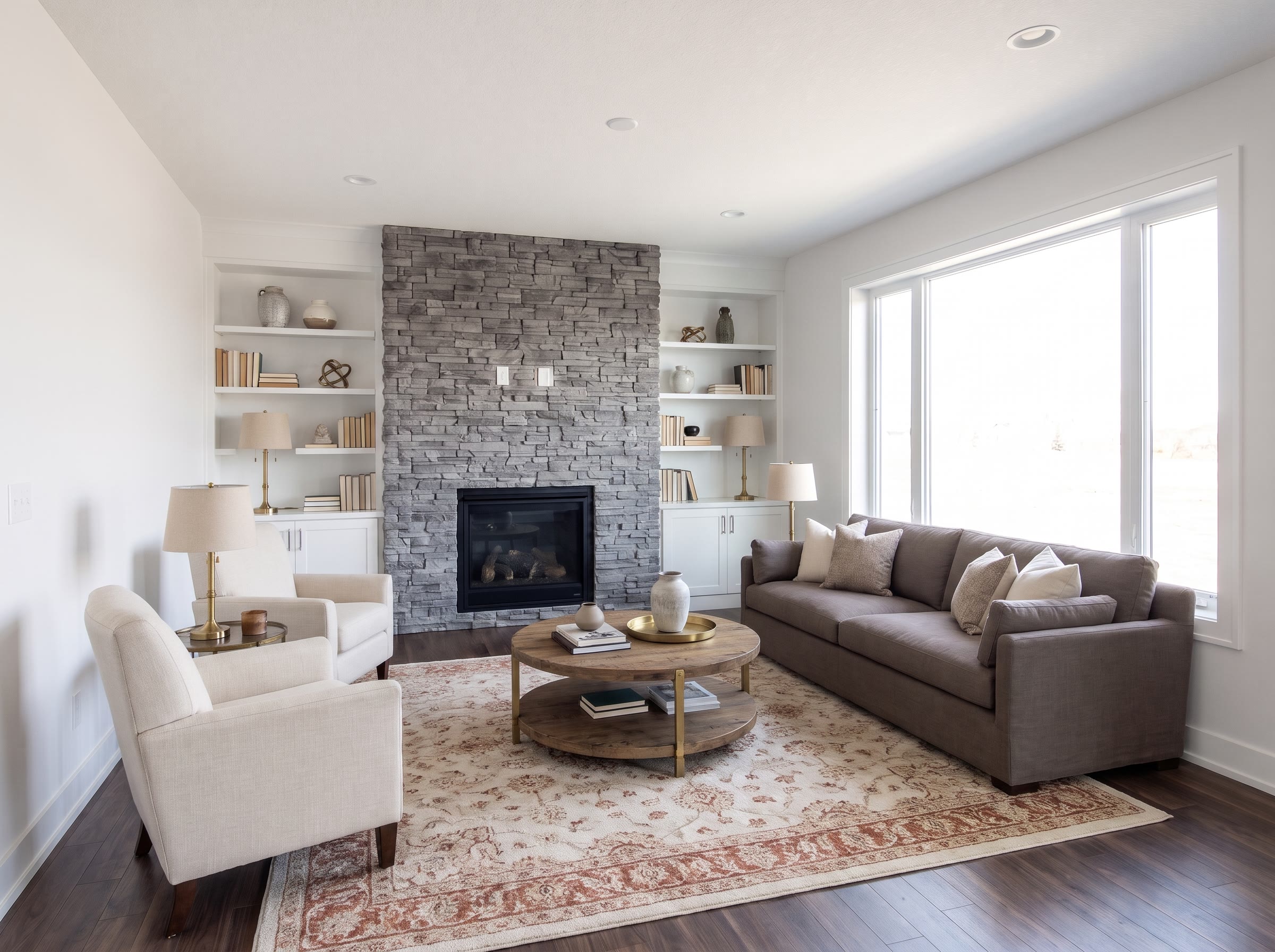
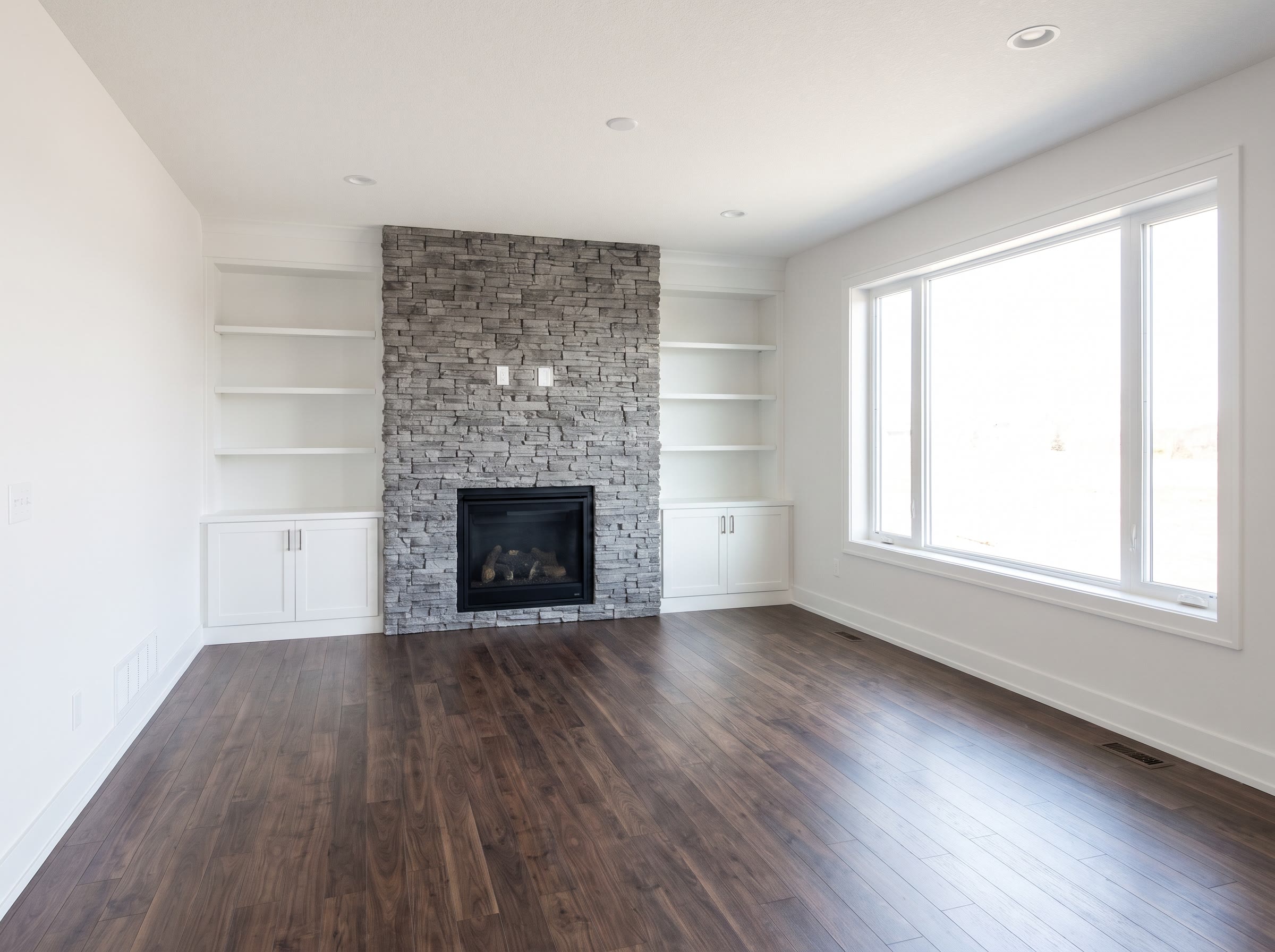
Virtual Staging – original imageVirtual Staging – generated result
Example result

How AI virtual staging works

  1. Upload an empty room photo

    Upload a listing shot of an empty, finished space: a living room, bedroom, dining area, kitchen or office. Shoot level from about chest height with the lights on.

  2. Add a style photo

    Upload one image of a furnished space in the look you want buyers to see. Lovspark AI takes the furniture style, colors and textures from it, not its layout.

  3. Generate the staged photo

    Click Generate (30 credits per run). Lovspark AI furnishes the space and keeps the walls, floors, windows and ceiling as photographed.

  4. Try another style

    Swap in a different style image and Lovspark AI stages the same space for another buyer; then download the result or keep editing it on the Lovspark canvas.

Eight virtual staging examples

Drag the line to compare · click to enlarge

Empty living room to Scandinavian

A bare living room becomes a light, calm space with a linen sofa, pale oak and wool, while the walls and floor stay as photographed.

Virtual staging for a primary bedroom

Lovspark AI adds an upholstered bed, nightstands and layered bedding in warm modern style; the carpet, windows and closet doors are unchanged.

Dining room in transitional style

Lovspark adds a round table, six chairs, a rug and a sideboard, giving the empty dining room a clear purpose, with the trim and windows untouched.

Open-plan kitchen and family room

Lovspark puts stools at the island, a dining table and a sectional in modern farmhouse style, so buyers see how the open space divides into zones.

Studio apartment for a rental listing

Lovspark AI fits a bed, a small sofa and a dining nook into one room in Japandi style, sized so the studio still feels open.

Spare room staged as a home office

The AI adds a desk, task chair, shelving and a reading chair to turn a small spare room into a clear work-from-home selling point.

Kids’ bedroom

Lovspark adds a twin bed, a play rug and low storage in soft colors to show families how the second bedroom can be used.

Condo with a city view

Lovspark keeps the floor-to-ceiling windows and view intact and adds a low sofa, a marble coffee table and sculptural lighting in contemporary style.

What Lovspark AI keeps from your photo

Compared onPhysical home stagingLovspark AI virtual staging
FurnitureRented, delivered and set up in the homeAdded to the listing image by AI
TurnaroundScheduled visits to stage and to collectOne AI run per photo
Changing the styleRestage the roomSwap the style photo and run again
ShowingsBuyers walk through a furnished homeThe room is still empty in person

Who uses AI virtual staging

How to get listing-ready virtual staging

How to shoot the empty room, choose a style, disclose staged photos and avoid the usual mistakes.

  1. Shoot an empty room that stages well
  2. Choose a style that fits the buyer
  3. Which rooms to stage first
  4. Disclose virtually staged photos
  5. Common mistakes
  6. Virtual staging or physical staging?
  7. Before you upload

Shoot an empty room that stages well

Shoot the empty space level, from a corner, with the lights on. Lovspark AI furnishes what it can see, so a clear floor and straight verticals give the most believable virtual staging.

  • Hold the camera level at about chest height and keep vertical lines straight.
  • Shoot from a corner or doorway so two walls and most of the floor are visible.
  • Clear boxes, tools and cables; the AI can mistake them for furniture.
  • Turn the lights on and avoid strong ultra-wide distortion.
  • Use images at least 1600 px wide.

Choose a style that fits the buyer

Stage for the people who will buy or rent the home. One clear image of the same room type in that look is enough for Lovspark AI.

  • Same room type: a bedroom photo for a bedroom gives the most natural furniture.
  • Price point: simple, light furniture for a starter condo; richer materials for a luxury listing.
  • Neutral first: light, neutral schemes suit most buyers; keep bold styles for a second version.
  • One style per run: avoid collages; use one photo and run again for another look.

Which rooms to stage first

Start with the rooms buyers look at first: the living room, the primary bedroom and the kitchen or dining area.

Small or multi-use spaces benefit too, because AI-placed furniture shows what a space is for: a spare bedroom reads better as an office or a nursery than as an empty box.

Disclose virtually staged photos

Label every virtually staged photo and keep the original. In the US, Article 12 of the NAR Code of Ethics requires REALTORS® to present a true picture in their advertising. In California, AB 723 requires listings that use digitally altered images, including AI-staged ones, to say so and to link to the unaltered original from January 1, 2026.

Rules differ by state and MLS, so check yours before publishing. Put a clear “Virtually staged” label on or next to each image and keep the empty original with it.

Source: NAR: 2025 Code of Ethics and Standards of Practice, California Legislative Information: AB-723 Real estate: digitally altered images: disclosure

Common mistakes

Most problems come from the source image or from over-staging. Check these five things before you publish.

  • Using staging to hide damage: it should furnish a room, not cover cracks, stains or missing fixtures.
  • Furniture that is too big for the real space or blocks doors and windows.
  • A style far from the home’s price point or neighborhood.
  • Clutter left in the shot that the AI turns into odd objects.
  • Publishing without a label or without the original image.

Virtual staging or physical staging?

Use Lovspark AI virtual staging for the online listing and physical staging when buyers will walk through a furnished home. Virtual home staging is quick to change and involves no furniture to move; physical staging lets visitors feel the space in person.

Many agents combine them: they furnish the main rooms for showings and virtually stage the rest, or virtually stage a vacant home for the listing photos only.

Before you upload

Check both images for these four things; a minute here saves a wasted run.

  • Upload JPG or PNG files, or paste them straight from your clipboard.
  • Put the empty room photo in the first box and the style image in the second.
  • Keep both images the same orientation, both landscape or both portrait.
  • Crop away watermarks, logos and borders from both images.
FAQ

AI Virtual Staging FAQ

01/What is virtual staging?

Virtual staging is adding furniture and decor to an image of an empty room with software instead of furnishing the home itself. Real estate agents use it to show buyers how a vacant room can be used. With Lovspark AI virtual staging, you upload the empty room photo and one style image; the AI adds furniture in that style while the room stays as photographed.

02/How does AI virtual staging work?

Lovspark AI reads the perspective, floor and light from your empty room photo and the furniture style, colors and textures from the style image, then places matching furniture, rugs, lighting and decor at the right scale. Each run uses 30 credits, with no 3D models to place.

03/Will it change the walls, floors or windows?

It is designed not to. Lovspark AI virtual staging adds furniture and decor only, and keeps paint color, flooring, windows, doors and ceilings as photographed. Small details can occasionally shift, so compare the staged image with the original before you publish it.

04/Do I have to disclose virtual staging?

In most cases, yes. The NAR Code of Ethics requires a true picture in real estate advertising, and in California AB 723 requires digitally altered listing images, including virtually staged ones, to be labeled and linked to the original from January 1, 2026. Label each image as virtually staged and check your state and MLS rules.

05/Is virtual staging worth it?

For vacant listings it usually is: AI-furnished images show scale and purpose that empty rooms do not, and Lovspark AI virtual staging costs 30 credits per run with no furniture to rent or move. It does not replace a furnished showing, and it cannot change the real condition of a home.

06/Which rooms can I virtually stage?

Any empty, finished interior: living rooms, bedrooms, dining rooms, open kitchens, home offices, kids’ rooms and studios. For bare concrete or unfinished spaces that still need walls and floors designed, use Unfinished Space Design, a Lovspark AI skill built for raw spaces.

07/Can I choose specific furniture?

Lovspark AI picks furniture to match your style image. To place exact products, such as a client’s sofa or pieces from a supplier catalog, use Furniture Placement in Lovspark, which puts the products you upload into the spots you mark in the scene.

08/Can I stage a room that still has furniture?

It works best on empty rooms. Existing furniture, boxes and clutter may stay in the image or confuse the layout, so clear the space before the shoot. Lovspark AI virtual staging adds furniture; it is not built to remove it.

09/What makes a good empty room photo?

A level, well-lit photo from a corner or doorway that shows two walls and most of the floor, at least 1600 px wide, with nothing left on the floor. Avoid extreme wide-angle shots: bent walls make the AI furniture look out of scale.

10/Where do my staged photos go?

Lovspark shows results on this page and saves them to the skill history in the Lovspark app. From there you can download them, compare styles side by side or keep editing on the Lovspark canvas.

More AI design skills

Browse all skills

AI Virtual Staging

Empty rooms look smaller and colder online. Upload one with a style image and Lovspark AI furnishes it for your listing, with the walls, floors and windows unchanged. Label it as virtually staged and publish.

22 AI design skills · 12 image and video models